Subscribe For Free Updates!

We'll not spam mate! We promise.

Showing posts with label Computer Tips And Tricks. Show all posts

Monday, 8 June 2015

How To Download Torrent File To IDM Easily

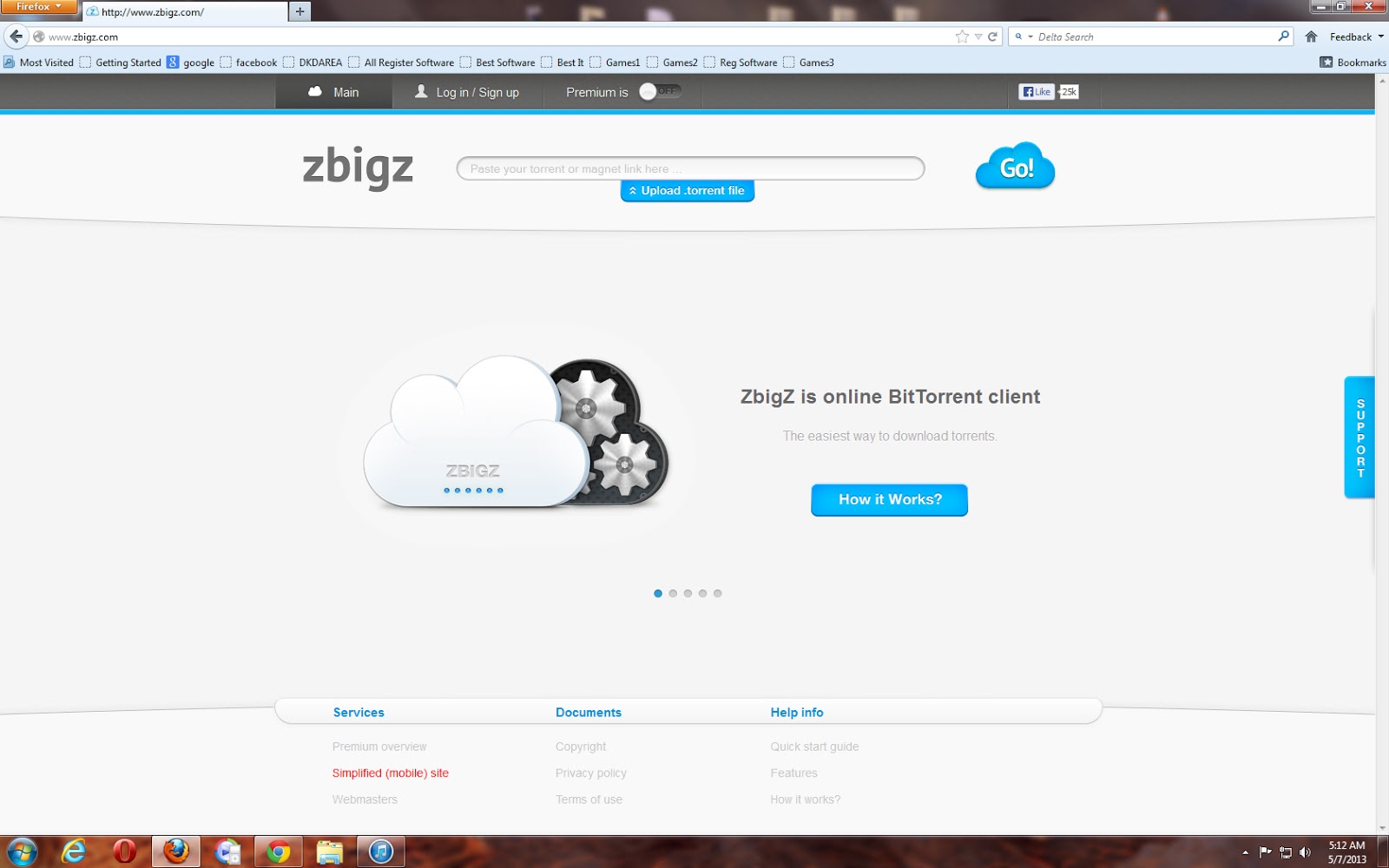
 How To Download Torrent File To IDM (Internet Download Manager) 


1st You open The Web Click Here To Open Web


How To Download Torrent File To IDM Easily


Now Click On Upload Torrent File This Window Will Be Open 


How To Download Torrent File To IDM Easily


Now Select Your Torrent Download File


How To Download Torrent File To IDM Easily


Open That File Now Your File Show On  This Bar
Now Click On Go Button

How To Download Torrent File To IDM Easily


Now Click On Free Button


How To Download Torrent File To IDM Easily

Now Your Torrent File show On That Box 
wait for some second 

How To Download Torrent File To IDM Easily


Now The Blue Down Arrow are show On Those File Who Show On This Box

How To Download Torrent File To IDM Easily

Click Here To Blue Down Arrow  

How To Download Torrent File To IDM Easily


Then This Window Will Be Open
Click To Free Button

How To Download Torrent File To IDM Easily


Now Your File Will Download On Internet Download Manager


How To Download Torrent File To IDM Easily


Enjoy Leave Comments Plz.....

njRat (Remote Administrator Tool) Full Version Free Download

njRat (Remote Administrator Tool) Full Version Free Download
"njRAT", The Saga Continues

 In June 2013, we released a paper containing information about the njRAT malware that included its functionality, indicators of compromise, and campaign codes used on the variants we had identified.

To this day, we continue to observe waves of blunt phishing attacks from compromised hosts in the Middle East, showing threat actors using multiple tools (including njRAT, AdwindRAT, Xtreme RAT, and H-Worm) in clustered phishing attacks against the same targets.  Some of these attacks continue to target the U.S. telecommunications sector with threat actors sending phishing emails using business-oriented lures containing the aforementioned tools or links to websites that serve these tools.


Additionally, we continue to directly observe significant activity from threat actors sending commands to the victim systems in the Middle East.


Further, we are observing attackers using the following obfuscators to make detection of this malware specimen more difficult for security analysts:


Note:Try At Your Own Risk


 njRat


Windows 7 Full Register Windows No Need To Activate Free Download

Windows 7 Full Register Windows No Need To Activate Free Download
Windows 7 Full Windows No Need To Activate Free Download Just Download And Install From USB OR boot able Cd No Need To Activate Full Register Window Enjoy....


Desktop

Themes

Support for topic has been extended in Windows 7. In supplements to backdrop the colors of the window chrome, desktop background, desktop icons, mouse pointers and sound schemes, topic in Windows 7 include desktop slideshow settings. A new control panel interface, accessible through the "Personalize" background menu scoop on the desktop, has been introduced which provides the talent to customize and switch between themes, as well as download more themes from Microsoft's web site. Support for "theme packs" is included; topic group are chest queue with an extension of .themepack, and consist of a .theme as well as any number of image, sound, icon, and mouse cursor files.[2] Windows 7 recognizes this queue pattern and evidence switch the user's topic to the theme contained inside when opened. A Windows 7 topic tins also specify an RSS meal from which new desktop backdrop images tins be downloaded.

Desktop Slideshow

Windows 7 includes a desktop slideshow that changes the desktop background in a designated count of time with a smooth stain transition. This feature supports pre-downloaded sets of wallpapers and also supports snapshot RSS feed.

Gadgets

Windows Vista introduced Gadgets and a sidebar which provides the skill to refuge Gadgets to the period of the user's desktop. In Windows 7, the sidebar has been removed, while contraption can still be placed on the desktop. Gadgets snap to certain stance on the desktop and from each other; dragging with the Shift key held down prevents contrivance from automatically snapping into position. Windows 7 adds a Windows Media Center gadget to the default mixture while ejection the Contacts and Notes gadgets.
Managing gadgets is more closely integrated with Windows Explorer, but the gadgets themselves continue to operate in a separate sidebar.exe process.[4] The Desktop context menu includes a new "Gadgets" menu option to access the gadget gallery, and a "View" sub-menu option to market or hide gadgets. Hiding contraption consequences in the sidebar.exe direction entity unloaded, which Microsoft says is a power-saving practice. Unlike Windows Vista, all contraption run in a single process, which saves memory, and the process is not run at all if the user has no appliance on the desktop. Gadgets tins be brought to the foreground on vertex of active persistence by pressing Win+G.

Branding and customization


OEMs and boldness are able to customize the logon screen wallpaper of Windows 7 that is displayed before a exploiter timber on.




 Win 7


IDM Register Tool Register Any Version OF IDM Free Download

IDM Register Tool Register Any Version OF IDM Free Download
Register Any Version OF IDM very Easy Just Copy It And Paste It Your IDM installation Folder And Install,
Ub app idm k her version ko register ker sakte hai bht he asani k sath...


 Registeration tool


How to Install And Play Android Games On Your Pc

How to Install And Play Android Games On Your Pc

How to Install And Play Android Games On Your Pc


Just Download And Install And Enjoy The Android games On Your Computer
NOTE:  If Its Not Run Then Update Your VGA Driver 


How to Install And Play Android Games On Your Pc


How to Install And Play Android Games On Your Pc


How to Install And Play Android Games On Your Pc


How to Install And Play Android Games On Your Pc


Click Here To Download


KEYBOARD USE ON MOUSE


KEYBOARD USE ON MOUSE
Agar ap  ka keyBoard kharab hO Gaya hai to Pareshan hone ki Zarurat nahin hai. Kyun Ke Ab Keyboard Ko Mouse Se Chalayen.
=> Click On Start

=> Click on Run and type osk

=> Aur Dekhiye KeyBoard Ko Apni Screen Per. EnjoyYyYyY  (*_*)

How To Install Urdu\Arabic Language In Your Pc Without Any Software


How To Install Urdu\Arabic Language In Your Pc Without Any Software

Goto Start=> Control panel => Regional And Languge Neche 1 Tab Ho Ga Languages Ka Whan English Likha Ho gGA Os Pe Click Kare Aur Urdu Ya Arabic Language Select Kree Then Ok Then Apply Urdu Ab Install Ho Chuki Hy, Start Menu Per Volume K Nazdek 1 Option Aa Jaye Ga Jis Me Likha Ho Ga Urdu English Ap Ne Ager Urdu Likhni Ho Tpo Urdu Select Kre Aur Kahi B Ap Urdu Likh Sakte Ho.Ager Ap Ko Urdu Keyboard chahye To Run Me Like Odk Press Enter Urdu Keyboard Ap K Samne Aa Jay Ga …
                                     End

Designing Icons Program


Designing Icons ProgramDesigning Icons Program


Hidden Window Programs For Designing Icons And Characters Open Run In Start And Type Eudcedit Press Enter.

How To Create Manny Folder At One Click

Create Many Folders For One Click


How To Create Manny Folder At One Click

Open Notepad Type MD Space 1 Space 2 Space 3 And Soo On And Save It Folder.Bat 
Now Open It And Folder Will Bee Created


SHUTDOWN ALL DETAIL AND COMMANDS | For Students


SHUTDOWN ALL DETAIL AND COMMANDS | For Students
 Here is easiest way to shut down yuur pc is to type (shutdown –s) in to cmd “command” and that will give a message that “the computer will shutdown and you have 30 seconds”
   -But if yuu just type (shutdown -a) it will abort the shutdown but there are other commands. I will just start off doing the easiest ones-


shutdown –s
>This will shutdown yuur pc in 30 seconds and display a message<

shutdown –s –t 40
>This will shutdown in 40 seconds but you can only go up to 86400 (24 hours) but if you make it 0 it will show no message and just shutdown<

shutdown –s –c ”haha the computer is going to shutdown”
>This will shutdown with a message in a box under the time<

shutdown –l
>This will just log you of the pC<

shutdown -i
>This will display the GUI shutdown window<

shutdown –r
>This Will restart the pC<

shutdown –a
>This will abort the shutdown<

shutdown –f
>This will force all running applications to close<

Post By Fahad